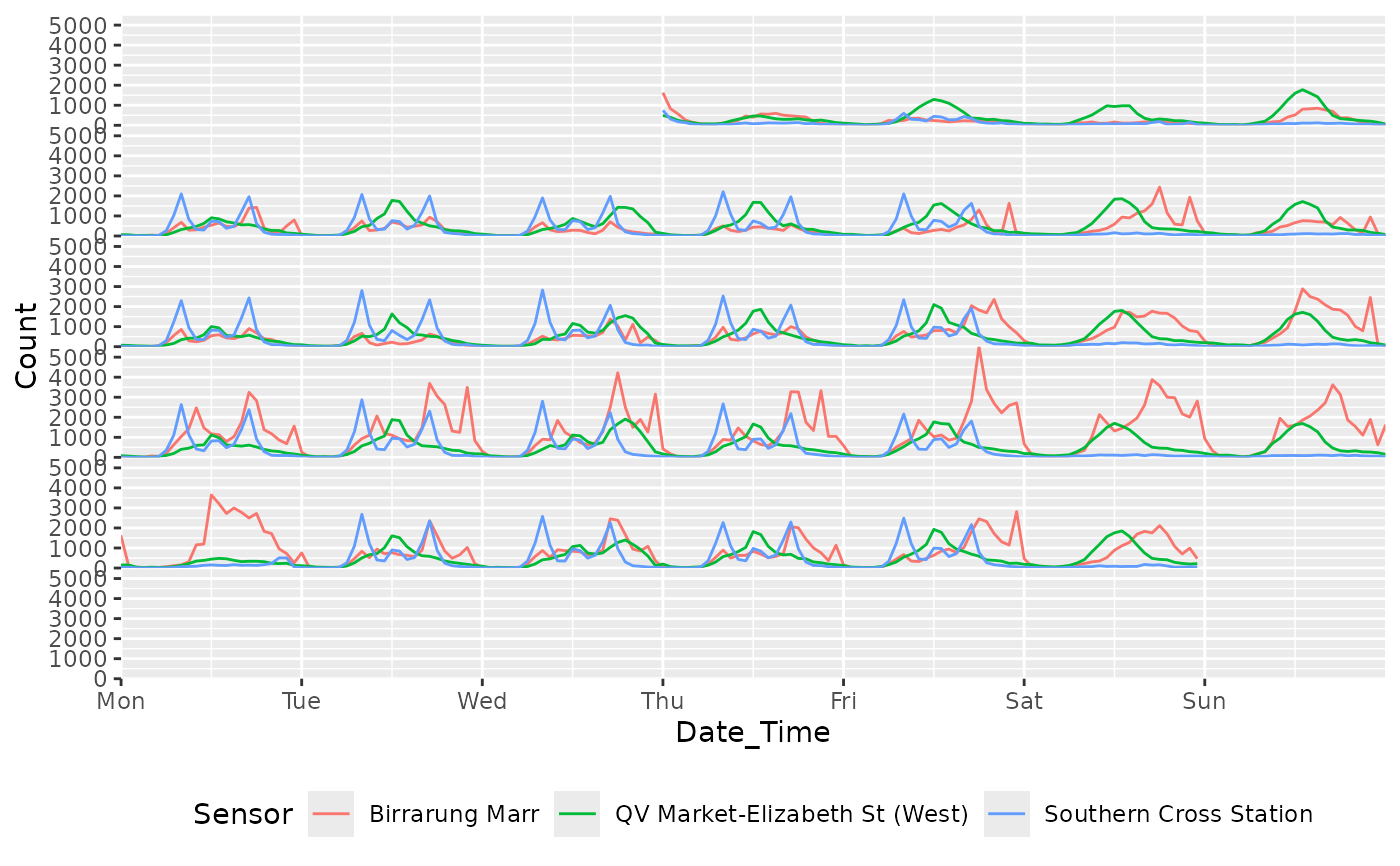
Arranges time series data into a calendar-like layout of rows and columns.
Data is cut into loops as in coord_loop(), with each loop becoming its
own row and column of a grid rather than being overlaid.
coord_calendar(
  cells = day(1L),
  rows = week(1L),
  blocks = NULL,
  panes = month(1L),
  cols = quarter(1L),
  pane_spacing = 0.25,
  col_spacing = 0.1,
  cell_ratio = NULL,
  label_cells = "{cyc(day, month)}",
  label_rows = NULL,
  label_blocks = NULL,
  label_panes = "{cyc(month, year, label = TRUE, abbreviate = TRUE)}",
  label_cols = NULL,
  time = "x",
  xlim = NULL,
  ylim = NULL,
  expand = FALSE,
  default = FALSE,
  clip = "on",
  coord = coord_cartesian()
)
Arguments
- cells
Size of a calendar cell (see the Granule hierarchy section); governs the cell labels and the only gridline drawn along the time axis.
NULL: no cells, no gridlines, no cell labelsa granule or duration, e.g.
mixtime::days(1L)
Defaults to
day(1L).- rows
Size of a calendar row:
coord_loop()'stime_loopsunder a calendar-specific name.NULL: a single row spanning the whole columna granule or duration, e.g.
mixtime::days(7L)
Defaults to
week(1L), orday(7L)if the calendar has noweek.- blocks
Size of a calendar block: rows are grouped and marked with a thicker gridline where each block starts.
NULL(default): no blocksa granule or duration, e.g.
mixtime::months(1L)
- panes
Size of a calendar pane: rows are grouped and set apart by a gap rather than a rule. Must be coarser than
rows, no coarser thancols.NULL: no panesa granule or duration, e.g.
mixtime::months(1L)
Defaults to
month(1L), silently dropped if it doesn't fit.- cols
Size of a calendar column, arranged left to right with no wrapping.
NULL: a single column spanning the whole time rangea granule or duration, e.g.
mixtime::quarters(1L)
Defaults to
quarter(1L), ormonth(3L)if the calendar has noquarter.- pane_spacing, col_spacing
Gap between panes of rows / between columns, as a fraction of one row's height / one column's width.
- cell_ratio
Aspect ratio of a calendar cell, as its height divided by its width, in the manner of
ggplot2::coord_fixed()but applied to a cell rather than to the data units of the axes.NULL(default): the panel takes whatever shape it is givena number, e.g.
1for the square cells of a printed calendar
Fixing a cell fixes the panel's own aspect ratio, so this cannot be combined with a
coordthat sets its ownratio, andtheme(aspect.ratio = )overrides it. Applies to a whole row's tile when there are no cells to divide it.- label_cells, label_rows, label_blocks, label_panes, label_cols
How to label each instance of a granule:
a
mixtimeformat string, astime_labelsofscale_x_mixtime(), e.g."{cyc(day, month)}"(a bare"{day}"is not valid)a function of the granule's times, returning a character vector
NULL(default except forlabel_cells/label_panes): no labels
Named by the time each instance starts, except a block or pane (which spans several rows), named by the time in the middle of the group.
- time
A string specifying which aesthetic contains the time variable that should be looped over. Default is
"x".- xlim, ylim
Limits for the x and y axes.
NULLmeans use the default limits.- expand
Logical indicating whether to expand the coordinate limits. Default is
FALSE.- default
Logical indicating whether this is the default coordinate system. Default is
FALSE.- clip
Should drawing be clipped to the extent of the plot panel? A setting of
"on"(the default) means yes, and a setting of"off"means no.- coord
The underlying coordinate system to use. Default is
coord_cartesian().
Details
Useful for visualizing long time spans with events over short intervals,
such as holidays. Cuts the time axis at every calendar boundary at once,
folds each piece into its row's window, and offsets it into its cell of
the grid. As with coord_loop(), geometries crossing a boundary are cut,
justified per align_discrete (see scale_x_mixtime()).
Granule arguments
cells/rows/blocks/panes/cols each accept:
NULLa duration, e.g.
mixtime::days(1L)a time granule, e.g.
mixtime::cal_gregorian$month(1L)a bare expression, e.g.
day(1L)ormonth(1L), naming a granule of whichever calendar the time axis resolves to (from the scale's common chronon, or the Gregorian calendar for a plainDate/POSIXctaxis)
Granule hierarchy
Granules sit in a strict hierarchy: col, pane, block, row, cell.
A granule never straddles a boundary of anything above it; a row cut
short by a coarser boundary is left blank for the rest of its width, as
on a printed calendar.
Breaks and labels
The time axis is broken at every cells boundary and labelled as a
position within the rows cycle (e.g. "Mon", "Tue", ...), unless
breaks/labels/time_breaks/time_labels are set explicitly (see
scale_x_mixtime()). Falls back to the scale's own breaks when cells
or rows is NULL, cells can't cut the axis, or a row holds too many
cells to name individually.
Theming
Each granule has its own theme elements, ggtime.calendar.<granule>.line,
.background and .text (<granule> = cell, row, block, pane or
col), inheriting from panel.grid, panel.background and text. The
panel's own grid is not drawn; the cell granule rules the time axis
instead.
+ theme(
  ggtime.calendar.block.line = element_line(linewidth = 1, linetype = "22"),
  ggtime.calendar.cell.line = element_blank()
)
A granule's labels are justified within the granule they belong to, each in a different default corner so several can be labelled at once without colliding.
Examples
library(ggplot2)
library(mixtime)
#>
#> Attaching package: ‘mixtime’
#> The following objects are masked from ‘package:base’:
#>
#>     %o%, date, months, quarters

# Hourly pedestrian counts in Melbourne, as mixtime time points.
pedestrian <- dplyr::mutate(tsibble::pedestrian, Time = datetime(Date_Time))

# A monthly calendar arrangement of pedestrian counts, showing the high
# activity at Birrarung Marr during the Australian Open in late January.
pedestrian_2015 <- dplyr::filter(
  pedestrian,
  mixtime::year(Time) == mixtime::year(2015L),
  Sensor == "Birrarung Marr"
)
ggplot(pedestrian_2015, aes(x = Time, y = Count, color = Sensor)) +
  geom_line() +
  coord_calendar(rows = month(1L), cols = NULL) +
  scale_x_mixtime(
    time_breaks = mixtime::days(1L),
    time_labels = "{cyc(day, cal_isoweek$week, label = TRUE, abbreviate = TRUE)}"
  ) +
  theme(
    legend.position = "bottom",
    axis.text.y = element_blank(), axis.ticks.y = element_blank()
  )